
xlf QandA series
Use Goal Seek to estimate Implied Volatility from multiple options
QUESTION
IS THERE A WAY TO ESTIMATE IMPLIED VOLATILITY ACROSS MULTIPLE OPTIONS USING GOAL SEEK WITHOUT SELECTING INDIVIDUAL INSTRUMENTS?
 Answer
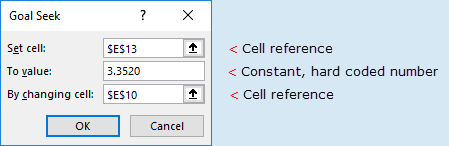
The Goal Seek dialog box (figure 1) has limitations on the input parameters, with single cell references and a hard coded number for the "To value:" argument. This prevents the use of Goal Seek in an array formula environment.
The solution is to code Goal Seek in VBA.
Required skills:
- Knowledge of option pricing and the concept of implied volatility
- Knowledge of VBA coding
Goal Seek example
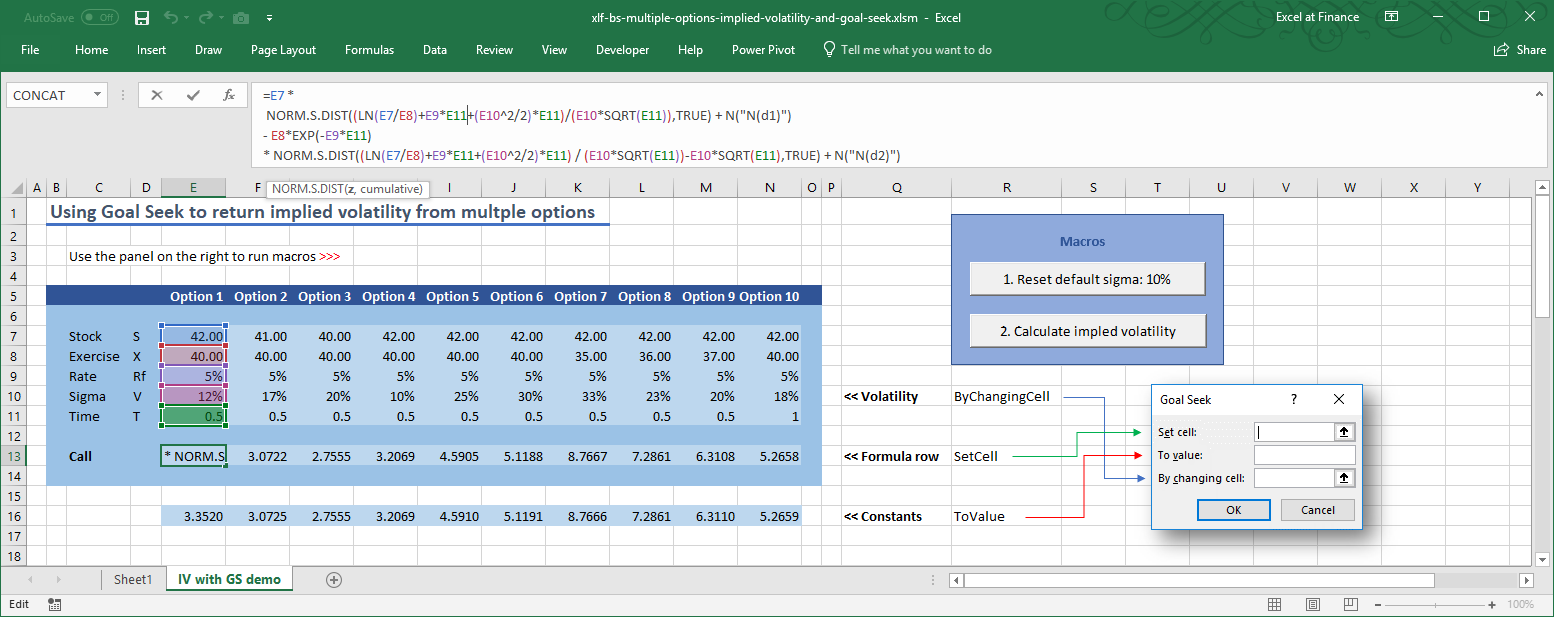
The worksheet shown in figure 2 includes 10 simulated options (rows 7 to 11) and theoretical call option prices for the Black-Scholes model in row 13.
VBA code to manipulate Goal Seek
GoalSeek is a method of the Range object.
The syntax for the GoalSeek method is:
| VBA function / property | Syntax |
|---|---|
| Range.GoalSeek (method) | .GoalSeek(Goal, ChangingCell) Returns TRUE if successful |
| Arguments | Description |
|---|---|
| Goal Compulsory | The target value you want returned in this cell |
| ChangingCell Compulsory | The cell that should be changed to achieve the target value |
Based on the IV with GS demo worksheet in figure 2, Range, Goal, and ChangingCell have range addresses of:
- Range:
Range("E13:N13") - Goal:
Range("E16:N16") - ChangingCell:
Range("E10:N10")
These values are assigned to variables in lines 14 to 16 of code 1.
Code 1: The implied volatility with Goal Seek macro
Option Explicit

Sub IVwithGS()
' Implied volatility with Goal Seek

Dim SetCellArr As Range         ' << Formula row
Dim ToValueArr() As Variant     ' << Constants
Dim ByChangingCellArr As Range  ' << Volatility

Dim Count As Integer

    Worksheets("IV with GS demo").Activate

    Set SetCellArr = Range("E13:N13")
    ToValueArr = Range("E16:N16").Value
    Set ByChangingCellArr = Range("E10:N10")

    For Count = 1 To Range("E13:N13").Columns.Count
        Range(SetCellArr(1, Count).Address).GoalSeek _
            Goal:=ToValueArr(1, Count), _
            ChangingCell:=Range(ByChangingCellArr(1, Count).Address)
    Next Count

End Sub
The GoalSeek statement is in lines 19 to 21 of code 1.
Maintenance code
Code 2: Maintenance code to Reset the IV line to default value of 10%
Sub ResetVols()

    Worksheets("IV with GS demo").Activate
    Range("E10:N10").Value = 0.1

End Sub
Code linking macros to the on-sheet controls
Code 3: ActiveX controls code
' Module (Sheet): Sheet2
' Requires:
'   1. CommandButton, Name: cmdCalc
'   2. CommandButton, Name: cmdReset

Private Sub cmdCalc_Click()
    Call IVwithGS
End Sub

Private Sub cmdReset_Click()
    Call ResetVols
End Sub
Resources
- Download the xlsm file used in this example xlf-bs-multiple-options-implied-volatility-and-goal-seek [148 KB].
- This example was developed in Excel 2016 64 bit (Microsoft Office 365 ProPlus).
- Published: 18 April 2018
- Revised: Friday 24th of February 2023 - 02:39 PM, Pacific Time (PT)