
xlf QandA series
Change argument value
QUESTION
I NEED A VBA PROCEDURE THAT CAN HELP ME TO CHANGE ONE OF THE ARGUMENTS IN AN EXISTING WS FUNCTION
For example I have arguments like =XXX(3,3,3), and need to change the last "3" into "1". Manually changing every function argument is an option but unfortunately I have 100s of them. [Sean, 29 July 2020]
 Answer
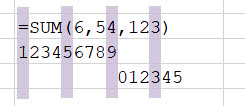
Let =XXX(3,3,3), from the question example, be =SUM(6,54,123) in the code 1 demonstration. The formula character count is shown in figure 1, with 14 characters in total.
VBA :: xlfReplaceSpecificArgument
An argument is the value passed to the function. The code 1 macro replaces the value of a specific argument in a WS function. The example changes =SUM(6,54,123) to =SUM(6,54,321).
Code 1: Macro
xlfReplaceSpecificArgument using InStr (left to right) - returns the position from the start of the string, or specified position
Sub xlfReplaceSpecificArgument()
Dim Item As Range
Dim strFormula As String
Dim intComma1 As Integer, intComma2 As Integer
Dim i As Long

    For Each Item In Sheets("Demo").UsedRange
        If Item.HasFormula Then
            strFormula = Item.Formula
            If Left(strFormula, 5) = "=SUM(" Then
                intComma1 = VBA.InStr(1, String1:=strFormula, String2:=",")
                intComma2 = VBA.InStr(intComma1 + 1, String1:=strFormula, String2:=",")
                Item.Formula = Left(strFormula, intComma2) & "321)" ' replace 3rd argument
                i = i + 1
            End If
        End If
    Next Item

    Debug.Print i, "Formulas replaced"

End Sub
About Code 1
- Line 12: HasFormula property returns Variant TRUE if cell has formula
- Line 13: Formula property returns the formula as a String in A1-style notation,
"=SUM(6,54,123)". The value is assigned to strFormula variable - Line 15: Using the inStr function start at character 1, and search strFormula for the first occurrence of a comma ",". Returns 7, assign to intComma1.
- Line 16: Using the inStr function start at character 8 (7 + 1), and search strFormula for the first occurrence of a comma ",". Returns 10, assign to intComma2.
- Line 17: Concatenate the 10 left characters from strFormula
=SUM(6,54, and 321)to form=SUM(6,54,321), then assign formula property to Item object
Alternate code: Macro
xlfReplaceSpecificArgument using InStrRev (right to left) - returns the position from the end of the string
'...
            If Left(strFormula, 5) = "=SUM(" Then
                intComma = VBA.InStrRev(strFormula, ",")
                ' inStrRev (line 15) -- [Rev]erse (right to left)
                Item.Formula = Left(strFormula, intComma) & "321)" ' replace 3rd argument - after last comma
                i = i + 1
 '...
- Line 16: alternate Using the inStrRev function start at the end and search strFormula for the first occurrence of a comma ",". Returns 10, assign to intComma.
- This example was developed in Excel 365 :: VBA 7.1
- Published: 29 July 2020
- Revised: Saturday 25th of February 2023 - 09:39 AM, [Australian Eastern Standard Time (EST)]